Ubiquiti UniFi
Download PDFRules, dashboards, and triggers for Ubiquiti UniFi devices
Overview
Ubiquiti UniFi devices support two types of syslog output:
- Activity Logging - CEF-formatted logs for admin actions, client events, and system status (sent to port 5521)
- Traffic Logging - Firewall/iptables logs for network traffic and security events (sent to dedicated port 5521)
App Function
- Parse CEF-formatted logs from Ubiquiti UniFi devices
- Parse iptables-formatted traffic logs from CyberSecure
- Extract UniFi-specific metadata (category, client info, AP details)
- Map standard CEF fields (src, dst, proto) to LogZilla tags
- Map UniFi threat categories to MITRE ATT&CK techniques
- Categorize events by type (security, network, system, auth, config)
- Provide dashboards for monitoring UniFi infrastructure and threats
Vendor Documentation
LogZilla Configuration
Traffic Logging requires a dedicated syslog port.
- Navigate to Settings > System > Application Ports
- Set Ubiquiti UniFi syslog port to a dedicated port (e.g.,
5521) - Click Save
The syslog and parser services will reload automatically. Both TCP and UDP listeners are enabled on the configured port.
LogZilla Cloud: the Application Ports page is not available on the
cloud platform, where devices reach LogZilla through a relay rather than
a direct syslog listener. To enable parsing there, tag UniFi events
at the relay with _source_type=unifi. See Application Ports on
LogZilla Cloud.
UniFi Configuration
UniFi has two separate logging configurations that must both be enabled.
Activity Logging (CEF Format)
Activity Logging sends CEF-formatted logs for admin actions, device events, and client activity.
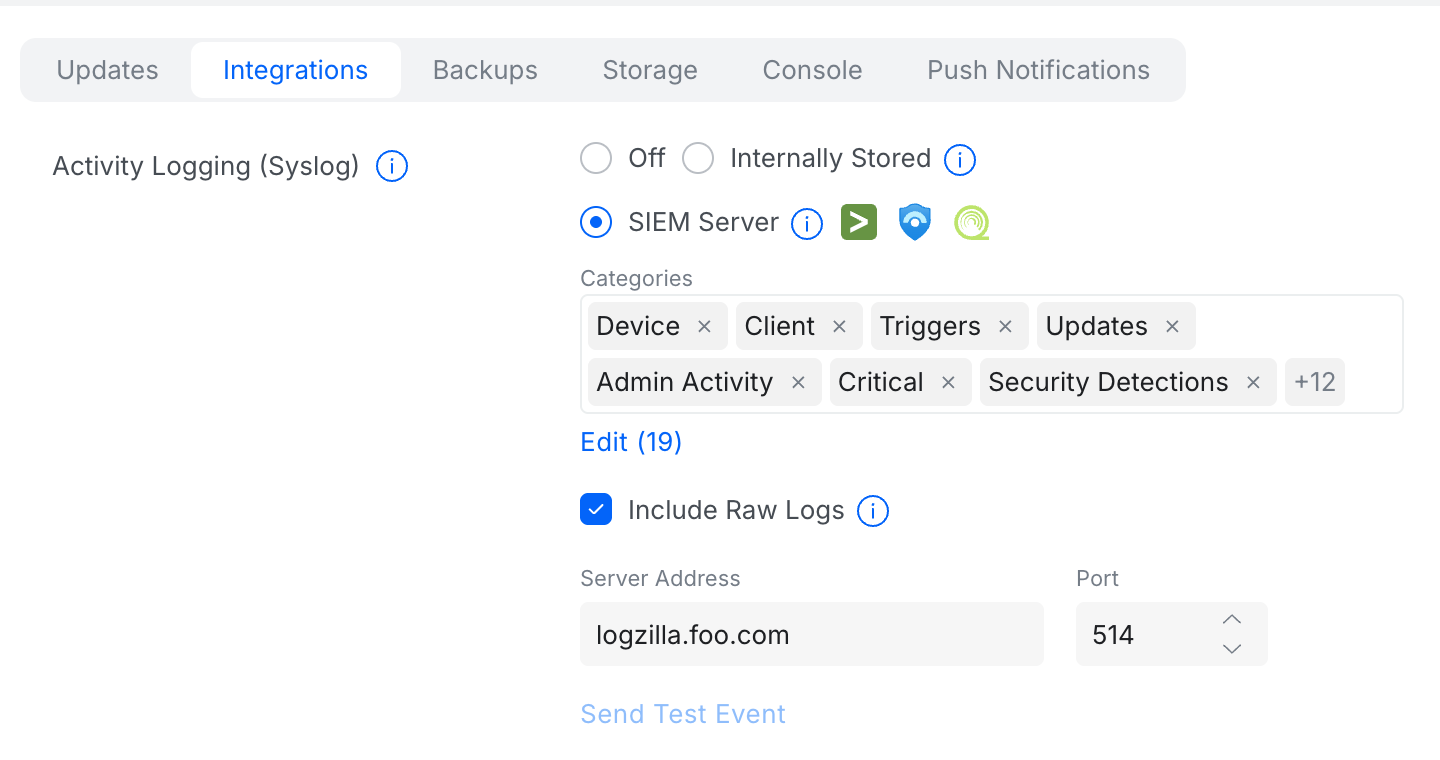
- Navigate to Settings > Control Plane > Integrations
- Under Activity Logging (Syslog), select SIEM Server
- Click Edit and select all desired Categories
- Enable Include Raw Logs
- Enter the LogZilla server address in Server Address
- Set the Port to 5521
- Click Apply Changes
Traffic Logging (CyberSecure)
Traffic Logging sends firewall and IPS logs in iptables format.
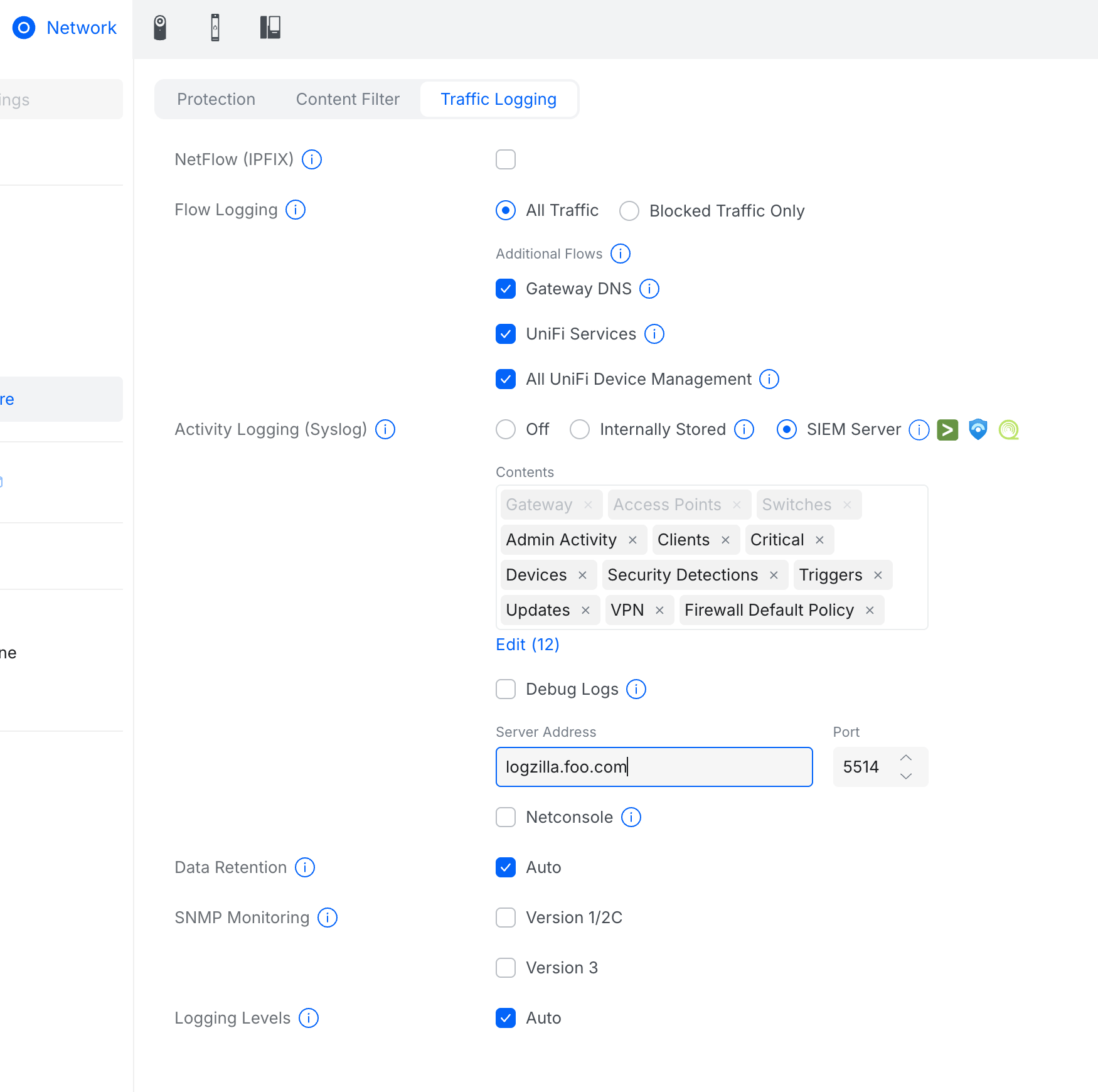
- Navigate to Settings > CyberSecure > Traffic Logging
- Under Flow Logging, select All Traffic or Blocked Traffic Only
- Enable desired Additional Flows (Gateway DNS, UniFi Services, etc.)
- Under Activity Logging (Syslog), select SIEM Server
- Select desired Contents categories
- Enter the LogZilla server address in Server Address
- Set the Port to 5521
- Click Apply Changes
Verification
Generate test traffic or trigger a configuration change, then verify events
appear in LogZilla with the Vendor tag set to Ubiquiti: Activity Logs also
carry the CEF Vendor tag, Traffic Logs show iptables as the program.
Incoming Log Format
UniFi devices send logs in Common Event Format (CEF):
textCEF:0|Ubiquiti|UniFi Network|9.3.33|401|WiFi Client Disconnected|2| UNIFIcategory=Monitoring UNIFIsubCategory=WiFi UNIFIhost=Office UDM Pro UNIFIclientMac=aa:bb:cc:dd:ee:ff UNIFIssid=Corporate-WiFi
- Version - CEF version (always
0) - Vendor - Device vendor (
Ubiquiti) - Product - Product name (
UniFi Network,UniFi OS) - Version - Product version
- Event ID - Event type identifier
- Name - Event description
- Severity - Event severity (0-10)
Parsed Metadata Fields
| Tag Name | Example | Description |
|---|---|---|
Vendor | Ubiquiti | Vendor identifier |
Product | UniFi | Product identifier |
Event Class | security | Cross-vendor event classification |
Event Type | Settings Change | Specific event type for triggering |
SrcIP | 10.0.0.100 | Source IP address (client) |
DstIP | 192.168.0.233 | Destination IP address (device/AP) |
SrcMAC | aa:bb:cc:dd:ee:ff | Source MAC address (client) |
DstMAC | 00:11:22:33:44:55 | Destination MAC address (AP/device) |
DstPort | https | Destination port service name |
Protocol | TCP | Network protocol |
User | admin | Username |
UniFi Category | Security | UniFi event category |
UniFi SubCategory | Threat | UniFi event subcategory |
UniFi Device Name | Lobby-AP | Connected device/AP name |
UniFi Client Name | iPhone | Client hostname |
UniFi SSID | Corporate-WiFi | WiFi network name |
UniFi Threat Type | Malware | Threat classification |
UniFi Threat Category | Command and Control | Threat category |
UniFi gateways also run standard daemons. Their dnsmasq, dhcpd, BIND, PAM and
iptables lines arriving on the UniFi port keep Vendor: Ubiquiti and
Product: UniFi and, when the matching Linux apps are installed, are
enriched by them (for example DHCP Message Type, DNS Query Type,
PAM Action, SrcIP to Port), so they stay on the UniFi dashboards.
Log Examples
WiFi Client Connected
textCEF:0|Ubiquiti|UniFi Network|9.3.33|400|WiFi Client Connected|2| UNIFIcategory=Monitoring UNIFIsubCategory=WiFi UNIFIhost=Office UDM Pro UNIFIclientMac=aa:bb:cc:dd:ee:ff UNIFIclientName=iPhone UNIFIssid=Corporate-WiFi UNIFIapName=Lobby-AP
Threat Detected
textCEF:0|Ubiquiti|UniFi Network|9.4.19|201|Threat Detected and Blocked|7| proto=TCP src=10.0.0.100 spt=52331 dst=192.168.0.233 dpt=443 UNIFIcategory=Security UNIFIsubCategory=Threat UNIFIthreatType=Malware UNIFIthreatCategory=Command and Control
Admin Login
textCEF:0|Ubiquiti|UniFi OS|4.3.6|admins|1| msg=admin changed the Syslog Settings network UNIFIcategory=System UNIFIsubCategory=Admin