Fortigate
Download PDFRules, dashboards, and triggers for Fortigate firewalls including WAF
Overview
Fortigate is a line of firewall devices produced by Fortinet. FortiGate Next Generation Firewalls enable security-driven networking and consolidate security capabilities such as intrusion prevention system (IPS), web filtering, secure sockets layer (SSL) inspection, and automated threat protection.
App Function
- Parse Fortigate key/value pair log format
- Extract high-value tags for analysis and alerting
- Provide dashboards for traffic, UTM (including WAF), and event monitoring
- Provide triggers for security alerts including WAF attacks
Vendor Documentation
Device Configuration
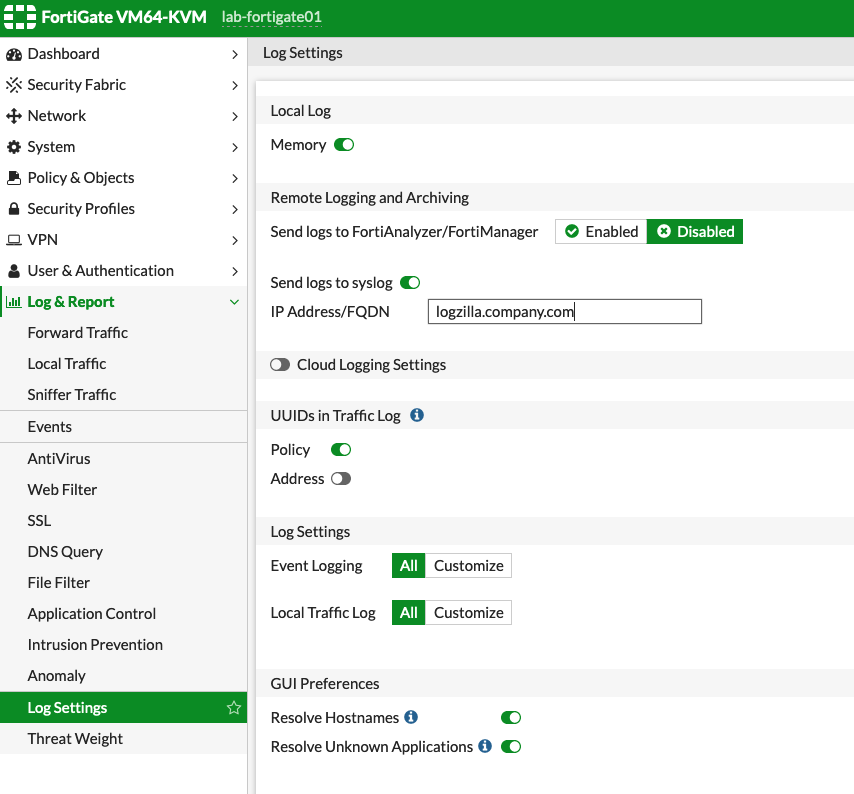
Configure the Fortigate device to send syslog messages to LogZilla:
- Log into the Fortigate web interface
- Navigate to Log & Report in the left sidebar
- Click Log Settings
- In the Remote Logging and Archiving section:
- Toggle Send logs to syslog to Enabled
- Enter the LogZilla server IP address or FQDN in the IP Address/FQDN field
- Leave the default syslog port (514) unless LogZilla is configured differently
- In the Log Settings section:
- Set Local Traffic Log to All (recommended) or Customize based on requirements
- Set Event Logging to All or Customize as needed
- Click Apply to save the configuration
Verification
Generate network traffic through the Fortigate, then verify events appear in
LogZilla with the program name Fortigate.
Incoming Log Format
Fortigate log messages consist of key/value pairs:
textdate=YYYY-MM-DD time=HH:MM:SS type="value" subtype="value" key="value" ...
- date/time - Timestamp fields (removed during processing)
- type - Log type (traffic, utm, event)
- subtype - Log subtype (forward, virus, webfilter, waf, user, etc.)
- key=value - Additional fields vary by event type
Parsed Metadata Fields
The app extracts high-value fields from Fortigate logs using standardized tag names for cross-vendor compatibility.
Global Tags
| Tag | Example | Description |
|---|---|---|
Vendor | Fortinet | Vendor name |
Product | FortiGate | Product name |
Event Class | security | Cross-vendor classification |
Event Type | intrusion | Specific event type (login_failure, malware, intrusion, access_denied) |
MitreId | T1190 | MITRE ATT&CK technique ID |
MITRE Tactic | Initial Access | MITRE ATT&CK tactic |
Standardized Tags
| Tag | Example | Description |
|---|---|---|
SrcIP | 10.1.100.11 | Source IP address |
DstIP | 172.16.200.55 | Destination IP address |
DstPort | https | Destination port (translated to service name) |
User | bob | Username |
Action | blocked | Action taken |
SrcInt | port12 | Source interface |
DstInt | port11 | Destination interface |
Fortigate-Specific Tags
| Tag | Example | Description |
|---|---|---|
Fortigate Type | traffic | Log type (traffic, utm, event) |
Fortigate Subtype | forward | Log subtype |
Fortigate Status | success | Event status |
Fortigate Service | HTTP | Service name |
Fortigate VDOM | vdom1 | Virtual domain |
Fortigate Attack | SQL.Injection | Attack name (IPS events) |
Fortigate Virus | EICAR_TEST_FILE | Detected virus name |
Fortigate Category | Malicious Websites | Web filter category |
Fortigate Profile | g-default | Security profile name |
Fortigate WAF Signature | SQL.Injection.Select.Statement | WAF attack signature |
Fortigate WAF Constraint | url-param-num | WAF HTTP constraint type |
Fortigate WAF Severity | high | WAF event severity |
Log Examples
Block SSL Traffic
textdate=2019-03-28 time=10:57:42 logid="1700062053" type="utm" subtype="ssl" eventtype="ssl-anomalies" level="warning" vd="vdom1" policyid=1 sessionid=11424 service="SMTPS" profile="block-unsupported-ssl" srcip=10.1.100.66 srcport=41296 dstip=172.16.200.99 dstport=8080 srcintf="port2" dstintf="unknown-0" proto=6 action="blocked" msg="Connection is blocked due to unsupported SSL traffic" reason="malformed input"
Successful Authentication
textdate=2019-05-13 time=15:55:56 logid="0102043008" type="event" subtype="user" level="notice" vd="root" srcip=10.1.100.11 dstip=172.16.200.55 policyid=1 interface="port10" user="bob" group="local-group1" authproto="TELNET(10.1.100.11)" action="authentication" status="success" reason="N/A" msg="User bob succeeded in authentication"
WAF Signature Detection
textdate=2018-12-27 time=14:55:20 logid="1203040001" type="utm" subtype="waf" eventtype="waf-signature" level="warning" vd="vdom1" policyid=1 sessionid=13614 user="bob" profile="waf_default" srcip=10.1.100.11 srcport=57304 dstip=172.16.200.55 dstport=80 srcintf="port12" srcintfrole="lan" dstintf="port11" dstintfrole="wan" proto=6 service="HTTP" url="http://app.example.com/api/v1/users?id=1+OR+1=1" severity="high" action="blocked" direction="request" agent="curl/7.47.0" signature="SQL.Injection.Select.Statement" rawdata="Method=GET|User-Agent=curl/7.47.0"
Web Access Denied
textdate=2019-05-13 time=16:29:45 logid="0316013056" type="utm" subtype="webfilter" eventtype="ftgd_blk" level="warning" vd="vdom1" policyid=1 sessionid=381780 srcip=10.1.100.11 srcport=44258 srcintf="port12" dstip=185.244.31.158 dstport=80 dstintf="port11" proto=6 service="HTTP" hostname="morrishittu.ddns.net" profile="test-webfilter" action="blocked" reqtype="direct" url="/" direction="outgoing" msg="URL belongs to a denied category in policy" catdesc="Malicious Websites"
MITRE ATT&CK Mapping
| Event Type | Technique | Tactic |
|---|---|---|
| IPS Detection | T1190 | Initial Access |
| Virus Detection | T1204 | Execution |
| Web Filter Block | T1071 | Command and Control |
| DLP Violation | T1048 | Exfiltration |
| App Control Block | T1071 | Command and Control |
| SSL Inspection | T1573 | Command and Control |
| SSH Inspection | T1021 | Lateral Movement |
| Auth Failure | T1110 | Credential Access |
| WAF Signature | T1190 | Initial Access |
Dashboards
| Dashboard | Description |
|---|---|
| FortiGate Traffic | Traffic flow analysis and top talkers |
| FortiGate UTM | Security events, blocks, and MITRE tactics |
| FortiGate Event | System events, HA status, and authentication |
Triggers
| Trigger | Description |
|---|---|
Fortigate: MITRE ATT&CK Threat Detected | Events with MITRE technique mapping |
Fortigate: Security Block | UTM block events (blocked, deny, dropped) |
Fortigate: Virus Detected | Antivirus detection events |
Fortigate: Intrusion Detected | IPS detection events |
Fortigate: Web Filter Block | Web filter block events |
Fortigate: Authentication Failure | Failed authentication attempts |
Fortigate: VPN Event | VPN connection events |
Fortigate: HA State Change | High availability state changes |
Fortigate: Critical System Event | Critical system events |
Fortigate: DLP Violation | Data leak prevention violations |
Fortigate: Application Control Block | Application control blocks |
Fortigate: WAF Attack Detected | WAF signature match events |
Fortigate: WAF Block | WAF block events |