ServiceNow Event Management
Download PDFSend LogZilla alerts to ServiceNow Event Management. Includes pre-built triggers, a forwarding-health dashboard, and a parser rule for monitoring delivery status.
Overview
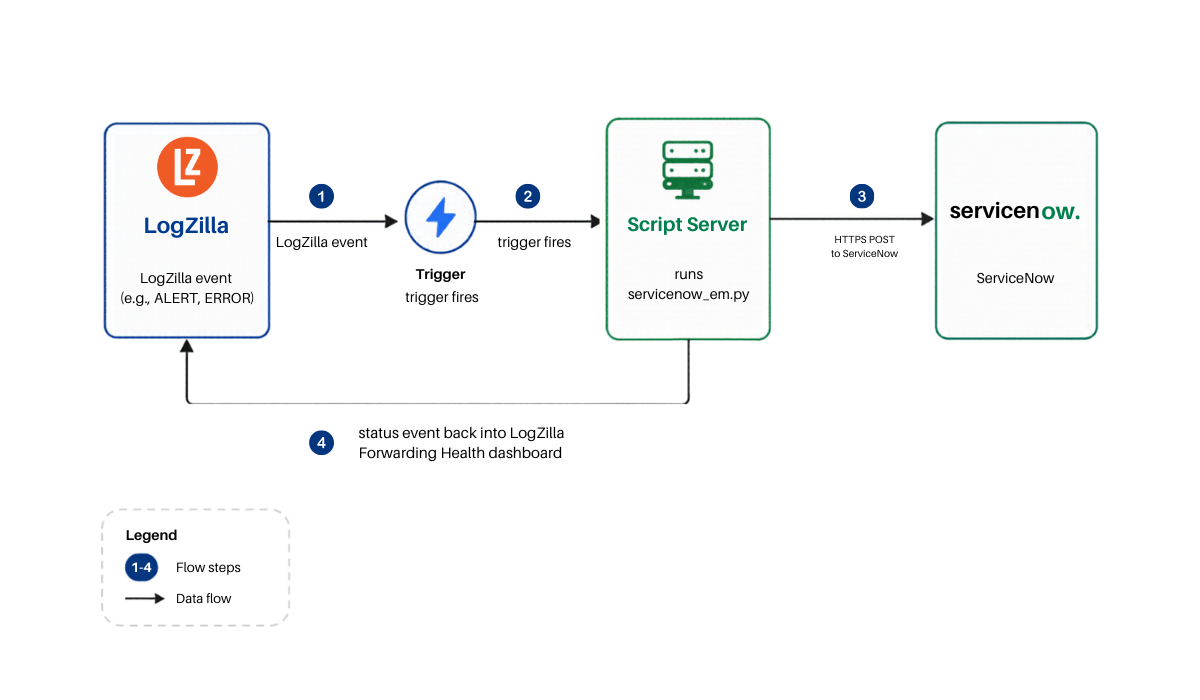
The ServiceNow Event Management app forwards selected LogZilla events
to a ServiceNow instance running the Event Management plugin
(sn_em_connector). Forwarded events appear in ServiceNow under
Event Management → All Events and roll up into alerts via
ServiceNow's built-in message_key correlation.
Events flow into the Event Management module in ServiceNow. Creating individual incident tickets through the Table API is a separate ServiceNow surface and is not handled here.
App Function
- Forwards selected LogZilla events to ServiceNow Event Management over HTTPS.
- Maps LogZilla syslog severity to ServiceNow EM severity, with an optional override table.
- Generates a stable correlation key so repeats of the same logical event roll up into a single ServiceNow alert.
- Retries transient network or 5xx errors automatically. Authentication errors fail fast so a misconfigured account is obvious.
- Reports forwarding outcomes back into LogZilla. Every attempt is visible on the included ServiceNow EM: Forwarding Health dashboard.
Event flow
Vendor Documentation
- ServiceNow Event Management product page: https://www.servicenow.com/products/event-management.html
- ServiceNow Event Management REST API: search
https://docs.servicenow.com/ for "Push events with the REST API"
or "Send events using the Event Management REST API". The
documented endpoint is
/api/global/em/jsonv2and has been stable across ServiceNow releases.
Prerequisites
The integration requires three things on the target ServiceNow
instance: the Event Management Connectors plugin
(sn_em_connector), a service account, and the
evt_mgmt_integration role on that account. Compatible with
Australia, Yokohama, and Zurich ServiceNow releases.
Install the Event Management Connectors plugin
The exact navigation path varies by ServiceNow release. The underlying plugin is the same.
-
Open Application Manager (in All, search
Application Manager) and search forsn_em_connector.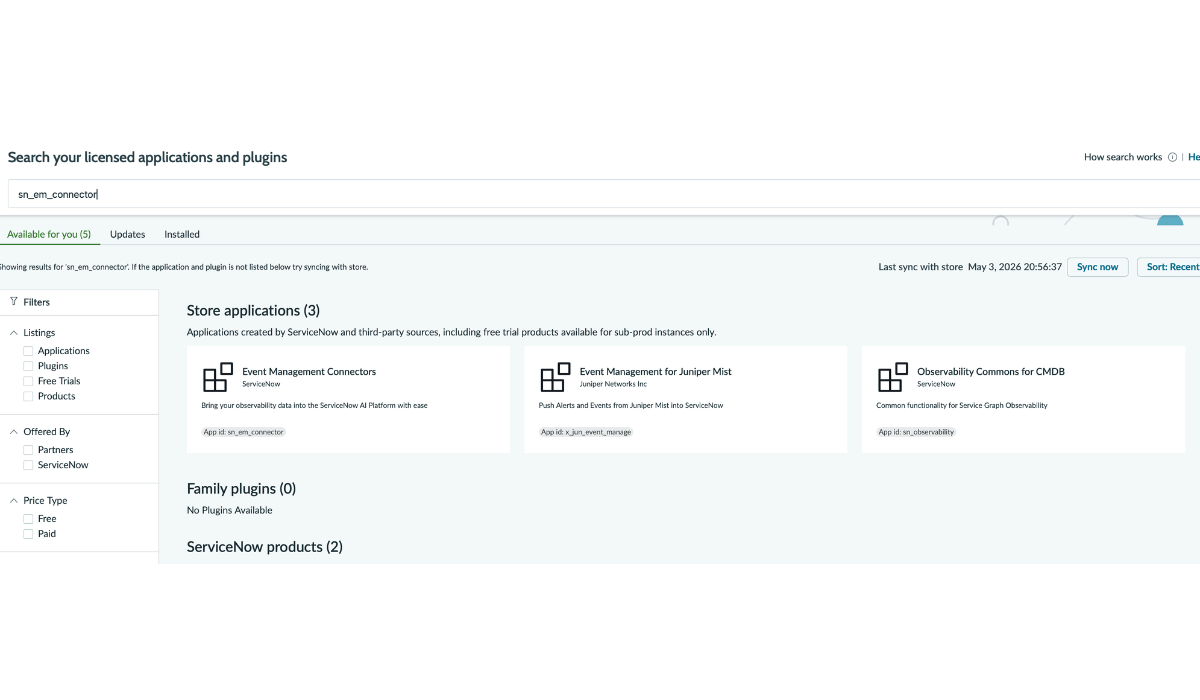
-
Open Event Management Connectors (App id:
sn_em_connector).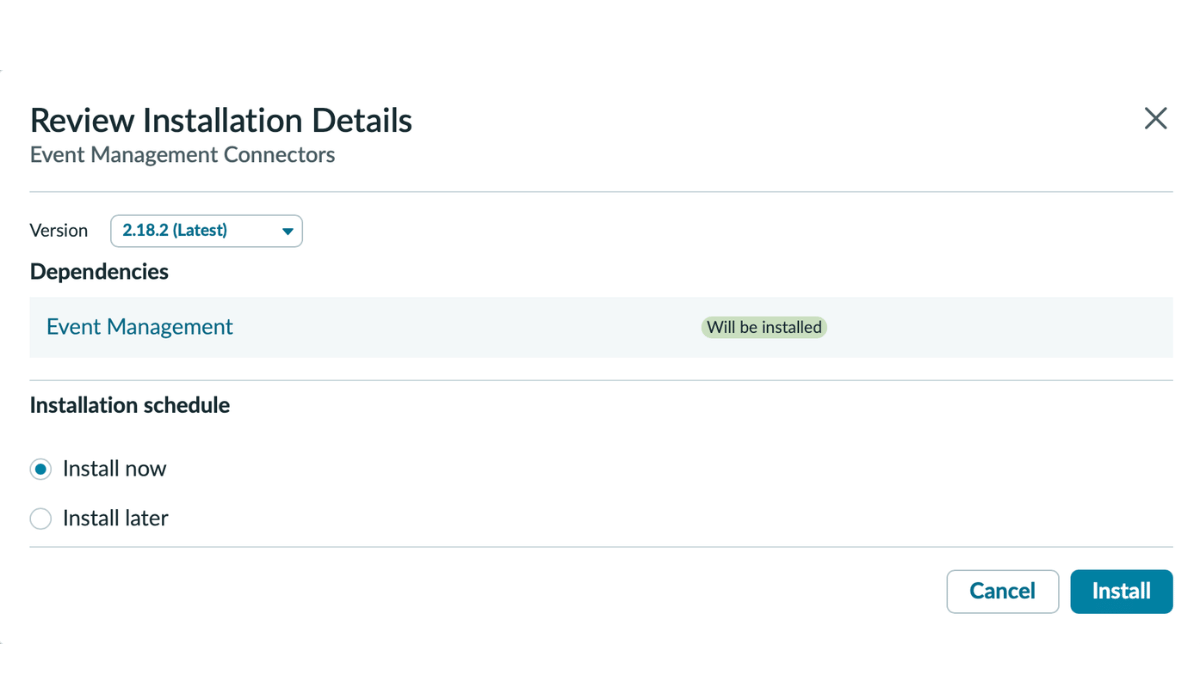
-
Click Install. The plugin pulls dependent packages (Discovery framework and others). Installation typically takes 5 to 15 minutes on a Personal Developer Instance, less on a production instance.
-
Wait for installation to finish.
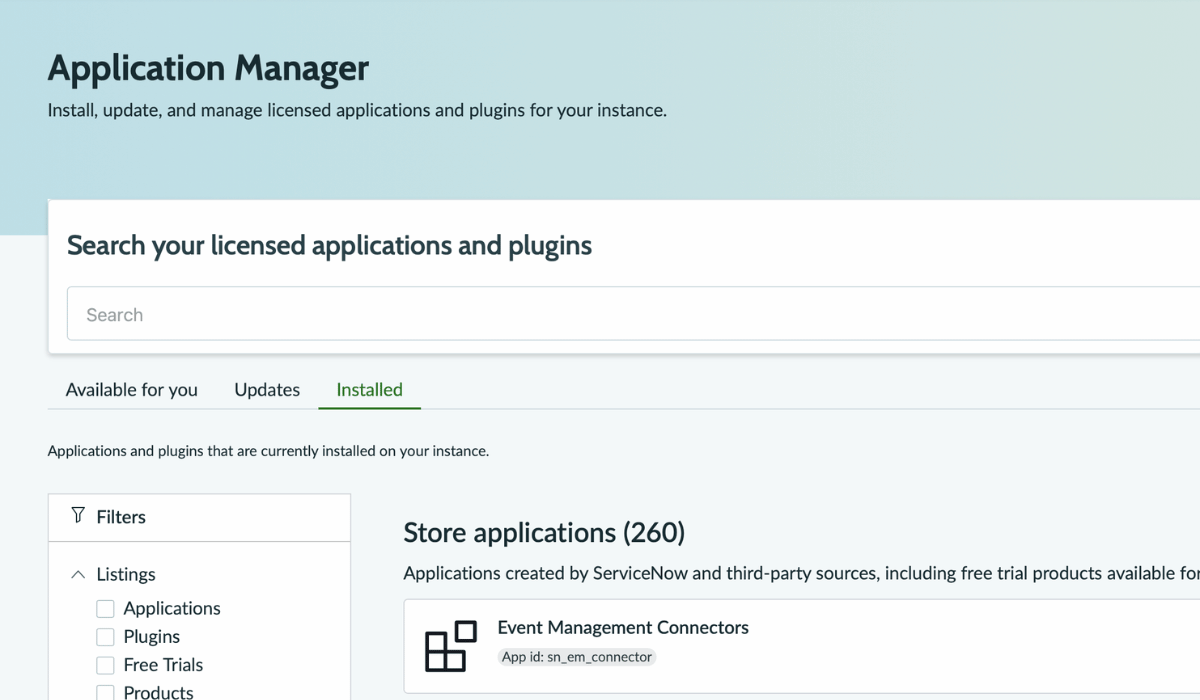
The plugin creates the evt_mgmt_integration role and exposes the
inbound REST endpoint at /api/global/em/jsonv2.
Create the integration service account
-
In All, search
Usersand open User Administration → Users. -
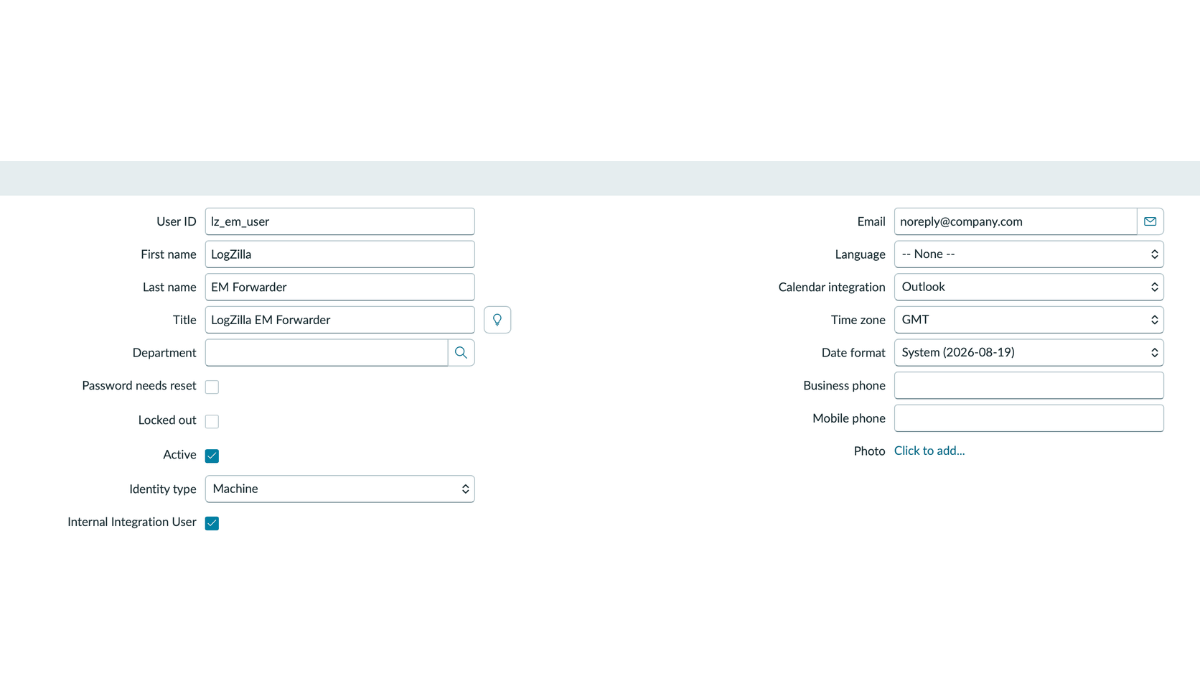
Click New and fill in:
- User ID:
lz_em_user(this becomes theusernamevalue in the LogZilla configuration file). - First name / Last name: descriptive labels (for
example,
LogZilla/EM Forwarder). - Email: a do-not-reply address controlled by the administrator. Leave blank if unsure.
- Active: checked.
- Identity type:
Machine(Australia, Yokohama, Zurich). Marks the account as non-interactive. - Internal Integration User: checked (Australia, Yokohama, Zurich).
- On older ServiceNow releases (pre-Xanadu): the two fields above are replaced by a single Web service access only checkbox. Check it.
- User ID:
-
Click Update to save. (Newer ServiceNow releases only show Update. It both saves the record and returns to the Users list.)
-
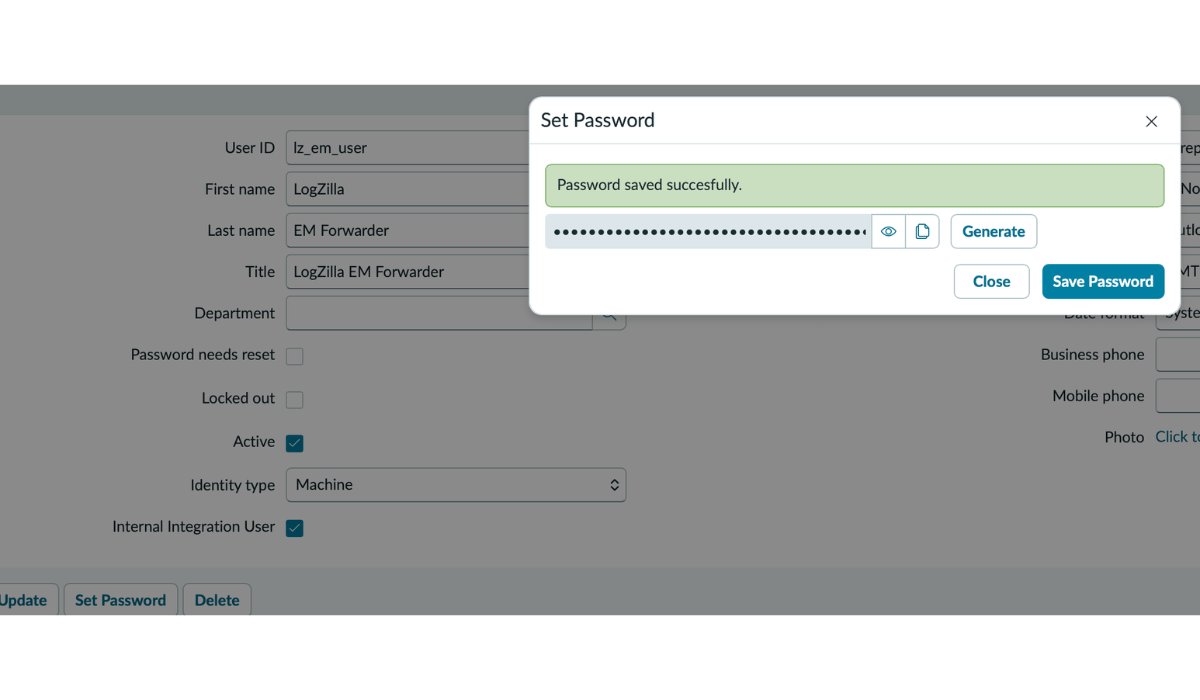
Reopen the user record from the Users list, click Set Password, click Generate, then Save Password. Copy the generated value somewhere safe. It goes into the LogZilla configuration file in a later step. Generated passwords are long and high-entropy. Do not type one by hand for a service account.
Grant the evt_mgmt_integration role
-
With the user record open, scroll to the Related Lists area below the form and click the Roles tab.
-
Click Edit to open the role picker.
-
In the search box on the left, type
evt_mgmt_integration. Move it to the right side and click Save.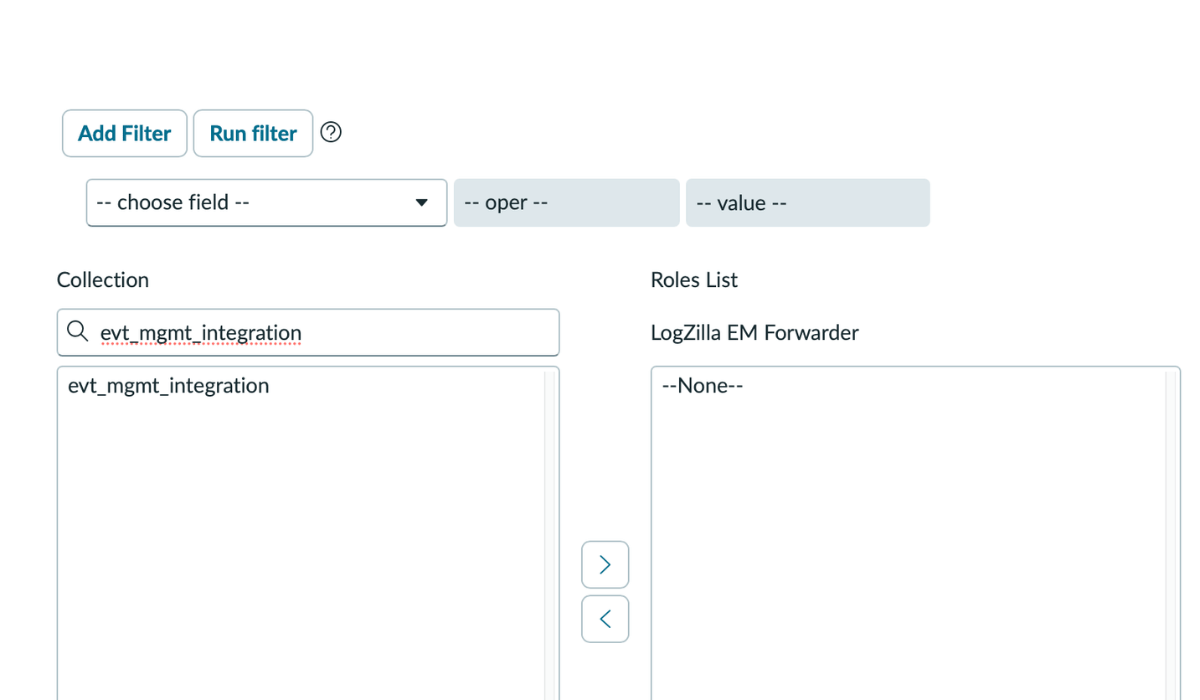
-
The user record's Roles list should show
evt_mgmt_integration. A second role,snc_required_script_writer_permission, may appear asInherited. That is a system-level dependency added automatically. Leave it in place.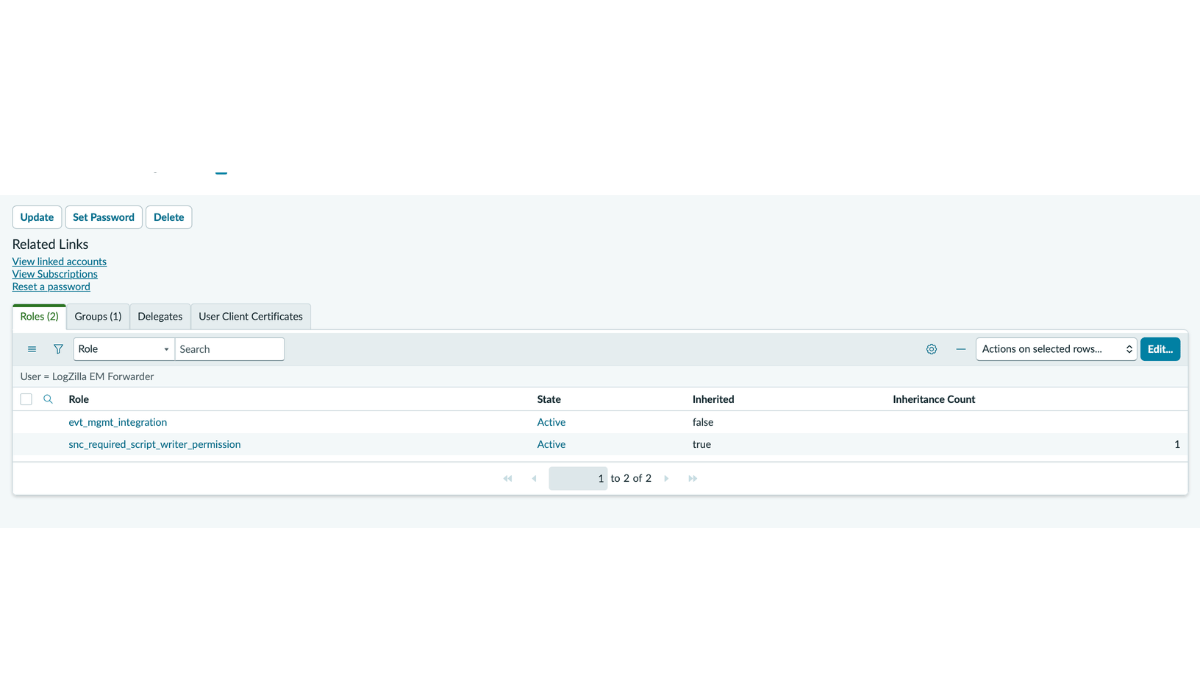
Network reachability
The LogZilla server must reach the ServiceNow instance over TCP/443 outbound. SaaS ServiceNow instances are reachable over the public internet. On-prem or private-network instances may require firewall rules.
Verify the ServiceNow side before installing on LogZilla
Before installing the LogZilla app, confirm the ServiceNow side
independently with a one-line curl from any host with network
access to the ServiceNow instance. If this step succeeds, every
later issue points at the LogZilla side, not at ServiceNow.
bashSN_PASSWORD='<paste the generated password>'
curl -sS -u "lz_em_user:${SN_PASSWORD}" \
-H 'Content-Type: application/json' \
-X POST 'https://yourinstance.service-now.com/api/global/em/jsonv2' \
-d '{
"records": [
{
"source": "LogZilla",
"node": "test-router-01",
"type": "BGP",
"resource": "BGP-5-ADJCHANGE",
"severity": 2,
"description": "test ServiceNow EM forwarding",
"message_key": "logzilla:smoketest-001",
"time_of_event": "'"$(date -u +'%Y-%m-%d %H:%M:%S UTC')"'"
}
]
}'
A successful response looks like:
json{
"result": {
"Default Bulk Endpoint": "1 events were inserted"
}
}
Then open Event Management → All Events and confirm a row
appeared with Source = LogZilla, Node = test-router-01,
Resource = BGP-5-ADJCHANGE, and State = Processed.
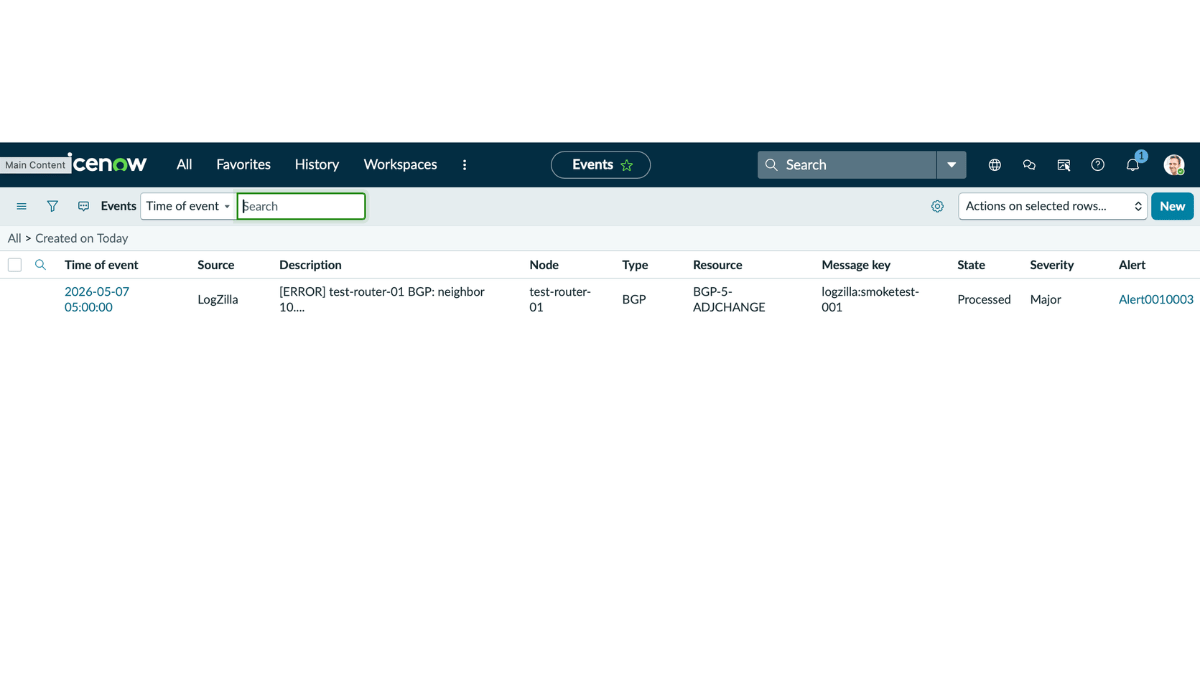
If the curl returns an error, fix the ServiceNow side before proceeding. Common causes are listed in Troubleshooting below.
Installation
The recommended path is the LogZilla web UI.
- Sign in to LogZilla as an administrator.
- Open Settings → Apps.
- Locate ServiceNow Event Management in the app list and click Install.
The web UI installs the forwarding script, the two pre-built
triggers, the parser rule, the Forwarding Health dashboard,
and the field schema. It also writes a default configuration file
to /etc/logzilla/apps/servicenow_em/config/config.yaml.
Alternate install path (CLI)
Administrators who prefer the command line can install from the LogZilla host shell instead of the web UI:
bashsudo logzilla apps install servicenow_em
The two paths produce identical results.
Restart the scriptserver
The scriptserver loads its registered scripts at service startup,
so it cannot see servicenow_em.py until it is restarted. Run
this once on the LogZilla host after the app is installed:
bashsudo logzilla restart -c scriptserver
This step is only required once, immediately after the first install. It is not needed for later configuration edits.
Configuration
After installation, edit the configuration file on the LogZilla host and replace three placeholder values with the real values from the ServiceNow setup above.
-
Open the configuration file as root:
bashsudo vi /etc/logzilla/apps/servicenow_em/config/config.yaml -
Replace the three placeholder values:
yamlinstance_url: "https://yourinstance.service-now.com/api/global/em/jsonv2" username: "lz_em_user" password: "REPLACE_WITH_SERVICENOW_PASSWORD"with the real values:
yamlinstance_url: "https://acme.service-now.com/api/global/em/jsonv2" username: "lz_em_user" password: "<paste the password generated in ServiceNow>" -
Save the file.
The script reads its configuration on every invocation, so no service restart is required. The next trigger that fires will pick up the new values.
The remaining fields in config.yaml are tunables (TLS verify,
retry budget, severity-mapping overrides, log level) and have
sensible defaults that work for most deployments. The full set of
configurable fields is documented in config/config_schema.yaml
shipped with the app.
Credential storage
The configuration file is owned by root and lives in a directory
created with mode 0700. The same posture applies to other
LogZilla integrations, such as SMTP credentials. Apply standard
host-security practices to the LogZilla server.
Severity mapping
LogZilla uses syslog severities (0 to 7). ServiceNow EM uses 0 to 5. The default mapping is:
| Syslog | Name | ServiceNow EM |
|---|---|---|
| 0 | Emergency | 1 (Critical) |
| 1 | Alert | 1 (Critical) |
| 2 | Critical | 1 (Critical) |
| 3 | Error | 2 (Major) |
| 4 | Warning | 3 (Minor) |
| 5 | Notice | 4 (Warning) |
| 6 | Info | 5 (Info) |
| 7 | Debug | 5 (Info) |
To override one or more rows, set the severity_map field in
config.yaml. Only listed keys are overridden. Unlisted syslog
severities keep their defaults. Example mapping that promotes
syslog Warning (4) from ServiceNow Minor (3) to ServiceNow Major
(2):
yamlseverity_map:
"4": "2"
The keys and values must be strings (quoted) so the schema sees the right types.
Triggers
The app installs two triggers:
- ServiceNow EM: Forward Actionable Events: fires for events
flagged actionable (the event
statusfield equal to 1), which an upstream rule or trigger sets viamark_actionable: true. - ServiceNow EM: Forward Critical Severity: fires for any event with syslog severity 0 to 3 (Emergency, Alert, Critical, Error).
Both triggers are throttled to one invocation per minute per matching event, and both ignore events the app itself produces so forwarding status reports do not loop back into ServiceNow.
Either trigger can be edited in Triggers in the LogZilla UI to tighten or broaden the filter, for example by restricting forwards to a specific Vendor.
Verification
After saving the configuration, confirm the integration is working end to end:
-
Generate a test event by sending a high-severity syslog message directly to the LogZilla receiver. Replace
<logzilla-host>with the LogZilla server's IP or hostname:bashlogger -d --rfc3164 -n <logzilla-host> -P 514 \ -t SN_TEST -p local0.error "ServiceNow EM forwarding test"-dforces UDP and--rfc3164pins the BSD wire format that the LogZilla syslog-ng source accepts. Without those flagsloggermay default to TCP and RFC5424, which the receiver silently drops. -
In LogZilla, open the ServiceNow EM: Forwarding Health dashboard. The test event should appear within a few seconds with SN Forward Status: ok.
-
In ServiceNow, open Event Management → All Events. The same event should appear with Source: LogZilla and State: Processed.
If either step does not show the event, see Troubleshooting below.
Forwarding Health Dashboard
The app installs a dashboard named ServiceNow EM: Forwarding Health that visualizes forwarding outcomes. Widgets cover:
- Total, successful, and failed forwards in the last 24 hours.
- Forward rate (events per second) and history.
- Top forwarded hosts.
- Distribution of HTTP status codes returned by ServiceNow.
- Distribution of attempt counts (1 indicates success on first try).
- Top errors when forwarding fails.
- A recent forwarding activity stream.
Parsed Metadata Fields
The app's parser rule extracts forwarding outcomes from the status
events the script reports back into LogZilla. The following tags
are present only on events with program=servicenow_em:
| Tag | Description |
|---|---|
| Vendor | LogZilla |
| Product | ServiceNow EM Forwarder |
| SN Forward Status | ok or fail |
| SN Forward Attempts | Number of HTTP attempts made |
| SN HTTP Status | HTTP response code (absent on network errors) |
| SN Duration ms | End-to-end forward duration in milliseconds |
| SN Forwarded Host | Host of the original forwarded LogZilla event |
| SN Forward Error | Error string when SN Forward Status is fail |
Troubleshooting
The forwarding script writes per-attempt detail to
/var/log/logzilla/servicenow_em.log on the LogZilla host. Start
there for any forwarding issue - the line for each attempt records
the source event, the HTTP status returned by ServiceNow, the
duration, and the error string on failure:
bashsudo tail -f /var/log/logzilla/servicenow_em.log
| Symptom | Likely cause | Resolution |
|---|---|---|
| HTTP 404 from ServiceNow | Event Management Connectors plugin not active, or the URL is wrong | Verify the plugin is installed. The URL must end in /api/global/em/jsonv2 |
| HTTP 401 | Wrong password, or the service account is locked out | Re-generate the password in ServiceNow (Set Password → Generate), update config.yaml |
| HTTP 403 | Service account lacks the evt_mgmt_integration role, or a custom ACL blocks the endpoint | Confirm the role is on the user's Roles related list |
| HTTP 405 ("Method not Supported") | URL is wrong (the endpoint accepts only POST) | Confirm the URL ends in /api/global/em/jsonv2 |
| Connection timed out | Network egress blocked | Check the firewall between the LogZilla server and the ServiceNow instance |
| Forwarding Health dashboard is empty | Triggers have not fired, or no events match the trigger filter | Send a test event directly to the receiver: logger -d --rfc3164 -n <logzilla-host> -P 514 -t SN_TEST -p local0.error "BGP down" |
| Forwarding works but Forwarding Health stays empty | Status events from the script are not reaching the LogZilla httpreceiver | Check /var/log/logzilla/servicenow_em.log for Skipping status event emission: SYSLOG_HOSTNAME or HTTP_INGEST_TOKEN not set. Restart the scriptserver so it picks up the env vars from the LogZilla container, then re-test with the verification steps above. |
Limitations
- One ServiceNow destination per LogZilla instance. Routing different events to different ServiceNow instances would require additional triggers and customization beyond the default behavior.
- Forwarding is one-way. "Clear" or "close" events are not sent automatically when a previously forwarded condition resolves. LogZilla's orchestration rules can be used to drive that lifecycle in ServiceNow when needed.